NDIS self-management.
Made simple.
Reduce the mental load that comes with self-management.

Three simple steps, from invoice to paid
Capsure breaks your self-management admin into three powerful steps - each one visualised clearly on your Board, the central hub of Capsure.

01
Ready for review
It starts the moment an invoice arrives
There are two ways to get an invoice onto your Board — by email or by upload. Providers can email it direct, or you can forward it from your own inbox.
Once it lands, Capsure extracts the key details automatically:
Provider name and ABN
Description of services
Dollar amount
Support category
Date of service
Original invoice file

Every Capsure user receives a custom Capsure email address
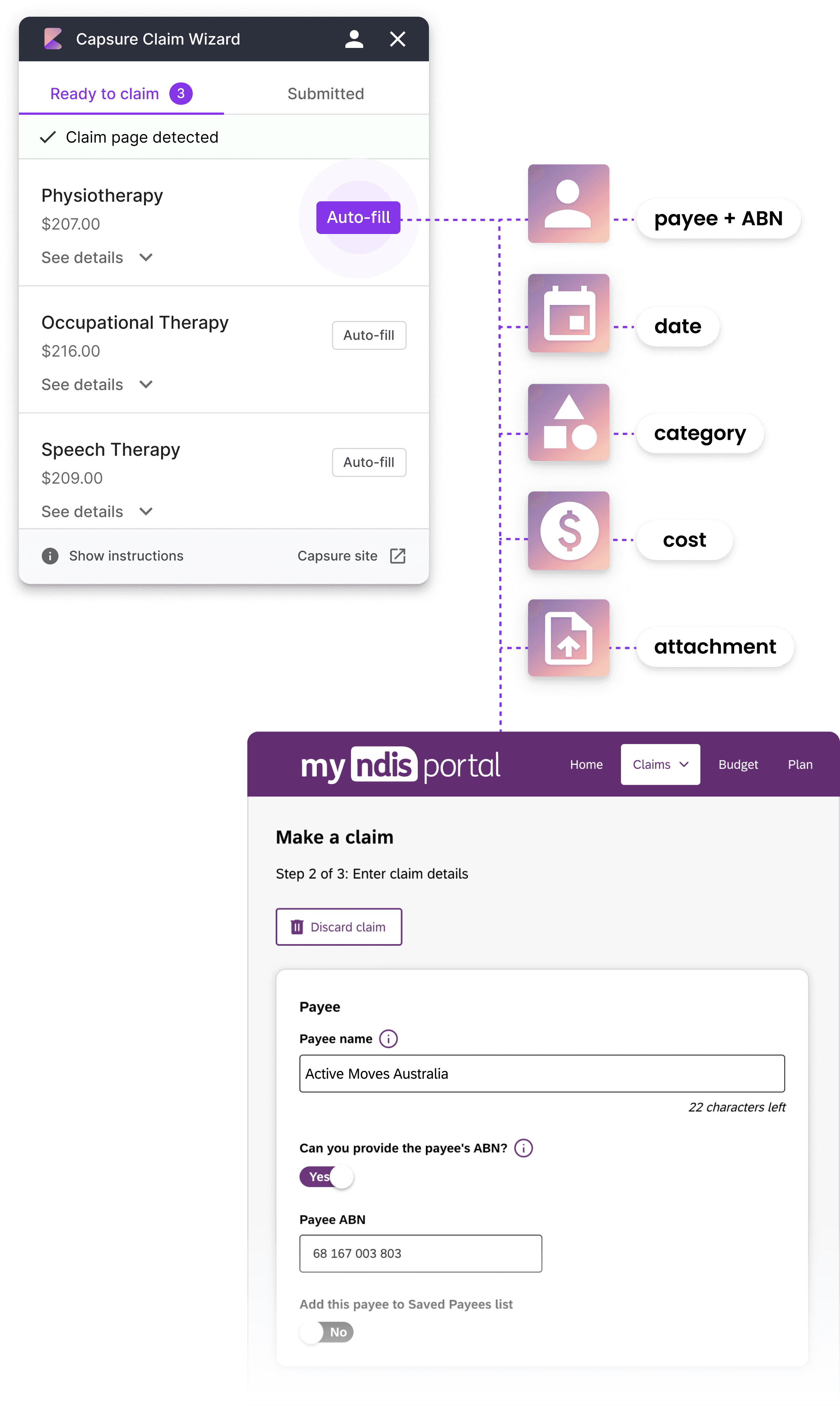
Sit back and relax while the claim form is filled out automatically.
02
Ready to claim
Claiming, faster than ever
Capsure's Claim Wizard — a Google Chrome extension — takes every invoice detail and fills your entire NDIS Portal claim form in under 30 seconds. Zero typing. It's here to speed up claiming like magic.
Once submitted, Claim Wizard saves your Claim ID and date to Capsure and moves it along automatically.
Install Claim Wizard
Claim Wizard runs on desktop & laptop only
Prefer the NDIS app or your mobile? Go ahead and claim your normal way! Claim Wizard is optional - you can still record your claim details in Capsure if you prefer to use your mobile to claim.
03
Claimed
Clarity after you've claimed
The invoice lands in Claimed — and Capsure keeps helping. We sort claimed invoices into expected NDIS deposits, so you know how much to expect and the day it should arrive.
We also break down the expected deposit — how much you can keep, how much to pay, and to which provider.

And you're done — until the next invoice lands.

When an NDIS payment lands in your bank account, we'll help you allocate it correctly.
Three simple steps, from invoice to paid
Capsure breaks your self-management admin into three powerful steps - each one visualised clearly on your Board, the central hub of Capsure.
01
Ready for review
It starts the moment an invoice arrives
There are two ways to get an invoice onto your Board — by email or by upload. Providers can email it direct, or you can forward it from your own inbox.
Once it lands, Capsure extracts the key details automatically:
Provider name and ABN
Description of services
Dollar amount
Support category
Date of service
Original invoice file
Every Capsure user receives a custom Capsure email address
Sit back and relax while the claim form is filled out automatically.
02
Ready to claim
Claiming, faster than ever
Capsure's Claim Wizard — a Google Chrome extension — takes every invoice detail and fills your entire NDIS Portal claim form in under 30 seconds. Zero typing. It's here to speed up claiming like magic.
Once submitted, Claim Wizard saves your Claim ID and date to Capsure and moves it along automatically.
Install Claim Wizard
Claim Wizard runs on desktop & laptop only
Prefer the NDIS app or your mobile? Go ahead and claim your normal way! Claim Wizard is optional - you can still record your claim details in Capsure if you prefer to use your mobile to claim.
03
Claimed
Clarity after you've claimed
The invoice lands in Claimed — and Capsure keeps helping. We sort claimed invoices into expected NDIS deposits, so you know how much to expect and the day it should arrive.
We also break down the expected deposit — how much you can keep, how much to pay, and to which provider.
And you're done — until the next invoice lands.
When an NDIS payment lands in your bank account, we'll help you allocate it correctly.

Three simple steps, from invoice to paid
Capsure breaks your self-management admin into three powerful steps - each one visualised clearly on your Board, the central hub of Capsure.
01
Ready for review
It starts the moment an invoice arrives
There are two ways to get an invoice onto your Board — by email or by upload. Providers can email it direct, or you can forward it from your own inbox.
Once it lands, Capsure extracts the key details automatically:
Provider name and ABN
Description of services
Dollar amount
Support category
Date of service
Original invoice file
Every Capsure user receives a custom Capsure email address
Sit back and relax while the claim form is filled out automatically.
02
Ready to claim
Claiming, faster than ever
Capsure's Claim Wizard — a Google Chrome extension — takes every invoice detail and fills your entire NDIS Portal claim form in under 30 seconds. Zero typing. It's here to speed up claiming like magic.
Once submitted, Claim Wizard saves your Claim ID and date to Capsure and moves it along automatically.
Install Claim Wizard
Claim Wizard runs on desktop & laptop only
Prefer the NDIS app or your mobile? Go ahead and claim your normal way! Claim Wizard is optional - you can still record your claim details in Capsure if you prefer to use your mobile to claim.
03
Claimed
Clarity after you've claimed
The invoice lands in Claimed — and Capsure keeps helping. We sort claimed invoices into expected NDIS deposits, so you know how much to expect and the day it should arrive.
We also break down the expected deposit — how much you can keep, how much to pay, and to which provider.
And you're done — until the next invoice lands.
When an NDIS payment lands in your bank account, we'll help you allocate it correctly.
Three simple steps, from invoice to paid
Capsure breaks your self-management admin into three powerful steps - each one visualised clearly on your Board, the central hub of Capsure.
01
Ready for review
It starts the moment an invoice arrives
There are two ways to get an invoice onto your Board — by email or by upload. Providers can email it direct, or you can forward it from your own inbox.
Once it lands, Capsure extracts the key details automatically:
Provider name and ABN
Description of services
Dollar amount
Support category
Date of service
Original invoice file
Every Capsure user receives a custom Capsure email address
Sit back and relax while the claim form is filled out automatically.
02
Ready to claim
Claiming, faster than ever
Capsure's Claim Wizard — a Google Chrome extension — takes every invoice detail and fills your entire NDIS Portal claim form in under 30 seconds. Zero typing. It's here to speed up claiming like magic.
Once submitted, Claim Wizard saves your Claim ID and date to Capsure and moves it along automatically.
Install Claim Wizard
Claim Wizard runs on desktop & laptop only
Prefer the NDIS app or your mobile? Go ahead and claim your normal way! Claim Wizard is optional - you can still record your claim details in Capsure if you prefer to use your mobile to claim.
03
Claimed
Clarity after you've claimed
The invoice lands in Claimed — and Capsure keeps helping. We sort claimed invoices into expected NDIS deposits, so you know how much to expect and the day it should arrive.
We also break down the expected deposit — how much you can keep, how much to pay, and to which provider.
And you're done — until the next invoice lands.
When an NDIS payment lands in your bank account, we'll help you allocate it correctly.
START FREE TODAY
Get started with Capsure
Your first five invoices are free - all features included, no credit card required.
Quick account set up
No credit card required
START FREE TODAY
Get started with Capsure
Your first five invoices are free - all features included, no credit card required.
Quick account set up
No credit card required
START FREE TODAY
Get started with Capsure
Your first five invoices are free - all features included, no credit card required.
Quick account set up
No credit card required
START FREE TODAY
Get started with Capsure
Your first five invoices are free - all features included, no credit card required.
Quick account set up
No credit card required
Two less things
to worry about
Self-managing already asks a lot of you. These two work quietly in the background — so missed payments and messy records don't have to be on your mind too.
NEED TO PAY
Nothing gets missed
Forgetting to pay a provider is easy when you're juggling everything else. Capsure keeps every Not paid invoice in one place — your Need to Pay list — and can remind you daily or weekly by email until it's sorted.

TABLE VIEW
Ready for anything, without the scramble
If the NDIA ever asks for records, you won't need to dig through emails or folders. Every invoice is stored and searchable in Table view, filtered by provider, category or date — so an audit is a quick check, not a stressful hunt.

Two less things
to worry about
Self-managing already asks a lot of you. These two work quietly in the background — so missed payments and messy records don't have to be on your mind too.
Nothing gets missed
Forgetting to pay a provider is easy when you're juggling everything else. Capsure keeps every Not paid invoice in one place — your Need to Pay list — and can remind you daily or weekly by email until it's sorted.
NEED TO PAY
Ready for anything, without the scramble
If the NDIA ever asks for records, you won't need to dig through emails or folders. Every invoice is stored and searchable in Table view, filtered by provider, category or date — so an audit is a quick check, not a stressful hunt.
TABLE VIEW
Two less things
to worry about
Self-managing already asks a lot of you. These two work quietly in the background — so missed payments and messy records don't have to be on your mind too.
Nothing gets missed
Forgetting to pay a provider is easy when you're juggling everything else. Capsure keeps every Not paid invoice in one place — your Need to Pay list — and can remind you daily or weekly by email until it's sorted.
NEED TO PAY
Ready for anything, without the scramble
If the NDIA ever asks for records, you won't need to dig through emails or folders. Every invoice is stored and searchable in Table view, filtered by provider, category or date — so an audit is a quick check, not a stressful hunt.
TABLE VIEW
Two less things
to worry about
Self-managing already asks a lot of you. These two work quietly in the background — so missed payments and messy records don't have to be on your mind too.
Nothing gets missed
Forgetting to pay a provider is easy when you're juggling everything else. Capsure keeps every Not paid invoice in one place — your Need to Pay list — and can remind you daily or weekly by email until it's sorted.
NEED TO PAY
Ready for anything, without the scramble
If the NDIA ever asks for records, you won't need to dig through emails or folders. Every invoice is stored and searchable in Table view, filtered by provider, category or date — so an audit is a quick check, not a stressful hunt.
TABLE VIEW
NEED TO PAY
Nothing gets missed
Forgetting to pay a provider is easy when you're juggling everything else. Capsure keeps every Not paid invoice in one place — your Need to Pay list — and can remind you daily or weekly by email until it's sorted.
TABLE VIEW
Ready for anything, without the scramble
If the NDIA ever asks for records, you won't need to dig through emails or folders. Every invoice is stored and searchable in Table view, filtered by provider, category or date — so an audit is a quick check, not a stressful hunt.
Two less things
to worry about
Self-managing already asks a lot of you. These two work quietly in the background — so missed payments and messy records don't have to be on your mind too.
NEED TO PAY
Nothing gets missed
Forgetting to pay a provider is easy when you're juggling everything else. Capsure keeps every Not paid invoice in one place — your Need to Pay list — and can remind you daily or weekly by email until it's sorted.
TABLE VIEW
Ready for anything, without the scramble
If the NDIA ever asks for records, you won't need to dig through emails or folders. Every invoice is stored and searchable in Table view, filtered by provider, category or date — so an audit is a quick check, not a stressful hunt.
Two less things
to worry about
Self-managing already asks a lot of you. These two work quietly in the background — so missed payments and messy records don't have to be on your mind too.
DEMO
Take a quick tour of Capsure
See how Capsure helps organise invoices, speed up claims, and reduce admin with our interactive demo.

DEMO
Take a quick tour of Capsure
See how Capsure helps organise invoices, speed up claims, and reduce admin with our interactive demo.

DEMO
Take a quick tour of Capsure
See how Capsure helps organise invoices, speed up claims, and reduce admin with our interactive demo.
DEMO
Take a quick tour of Capsure
See how Capsure helps organise invoices, speed up claims, and reduce admin with our interactive demo.
GENERAL FAQ
Learn more
Answers to the questions we hear most from self-managed families.
Visit our Help Centre
What is Capsure?
Capsure is an NDIS self-management tool that takes the admin out of self-managing a plan. It gets your invoices organised, auto-fills your claims in the myNDIS Participant Portal, and keeps track of what's been paid — so you spend less time on paperwork and more time on what matters.
Who is Capsure for?
Capsure is built for NDIS participants who self-manage their plan, and for nominees — like parents and guardians — managing a plan on someone else's behalf. If you're the one juggling invoices and claims, Capsure is for you.
Does Capsure submit claims for me?
Not quite — you'll still submit claims yourself through the NDIS Participant Portal, so you stay fully in control. What Capsure does is prepare everything and auto-fill the claim form for you, cutting the manual work down to a final review and click.
Is my data secure?
Yes. Your documents are stored securely with DigitalOcean, an Australian-based provider certified to SOC 2 Type II, SOC 3 Type II, and CSA STAR Level 1 — recognised global standards for information security.
Is there a free trial?
Yes — your first five invoices are free, with every feature included and no credit card required. Plenty to see if Capsure fits before you commit.
Is Capsure available on mobile?
Yes, Capsure works in any mobile browser. The Claim Wizard's auto-fill currently requires desktop Chrome — a native app is on the way.
GENERAL FAQ
Learn more
Answers to the questions we hear most from self-managed families.
Visit our Help Centre
What is Capsure?
Capsure is an NDIS self-management tool that takes the admin out of self-managing a plan. It gets your invoices organised, auto-fills your claims in the myNDIS Participant Portal, and keeps track of what's been paid — so you spend less time on paperwork and more time on what matters.
Who is Capsure for?
Capsure is built for NDIS participants who self-manage their plan, and for nominees — like parents and guardians — managing a plan on someone else's behalf. If you're the one juggling invoices and claims, Capsure is for you.
Does Capsure submit claims for me?
Not quite — you'll still submit claims yourself through the NDIS Participant Portal, so you stay fully in control. What Capsure does is prepare everything and auto-fill the claim form for you, cutting the manual work down to a final review and click.
Is my data secure?
Yes. Your documents are stored securely with DigitalOcean, an Australian-based provider certified to SOC 2 Type II, SOC 3 Type II, and CSA STAR Level 1 — recognised global standards for information security.
Is there a free trial?
Yes — your first five invoices are free, with every feature included and no credit card required. Plenty to see if Capsure fits before you commit.
Is Capsure available on mobile?
Yes, Capsure works in any mobile browser. The Claim Wizard's auto-fill currently requires desktop Chrome — a native app is on the way.
GENERAL FAQ
Learn more
Answers to the questions we hear most from self-managed families.
Visit our Help Centre
What is Capsure?
Capsure is an NDIS self-management tool that takes the admin out of self-managing a plan. It gets your invoices organised, auto-fills your claims in the myNDIS Participant Portal, and keeps track of what's been paid — so you spend less time on paperwork and more time on what matters.
Who is Capsure for?
Capsure is built for NDIS participants who self-manage their plan, and for nominees — like parents and guardians — managing a plan on someone else's behalf. If you're the one juggling invoices and claims, Capsure is for you.
Does Capsure submit claims for me?
Not quite — you'll still submit claims yourself through the NDIS Participant Portal, so you stay fully in control. What Capsure does is prepare everything and auto-fill the claim form for you, cutting the manual work down to a final review and click.
Is my data secure?
Yes. Your documents are stored securely with DigitalOcean, an Australian-based provider certified to SOC 2 Type II, SOC 3 Type II, and CSA STAR Level 1 — recognised global standards for information security.
Is there a free trial?
Yes — your first five invoices are free, with every feature included and no credit card required. Plenty to see if Capsure fits before you commit.
Is Capsure available on mobile?
Yes, Capsure works in any mobile browser. The Claim Wizard's auto-fill currently requires desktop Chrome — a native app is on the way.
GENERAL FAQ
Learn more
Answers to the questions we hear most from self-managed families.
Visit our Help Centre
What is Capsure?
Capsure is an NDIS self-management tool that takes the admin out of self-managing a plan. It gets your invoices organised, auto-fills your claims in the myNDIS Participant Portal, and keeps track of what's been paid — so you spend less time on paperwork and more time on what matters.
Who is Capsure for?
Capsure is built for NDIS participants who self-manage their plan, and for nominees — like parents and guardians — managing a plan on someone else's behalf. If you're the one juggling invoices and claims, Capsure is for you.
Does Capsure submit claims for me?
Not quite — you'll still submit claims yourself through the NDIS Participant Portal, so you stay fully in control. What Capsure does is prepare everything and auto-fill the claim form for you, cutting the manual work down to a final review and click.
Is my data secure?
Yes. Your documents are stored securely with DigitalOcean, an Australian-based provider certified to SOC 2 Type II, SOC 3 Type II, and CSA STAR Level 1 — recognised global standards for information security.
Is there a free trial?
Yes — your first five invoices are free, with every feature included and no credit card required. Plenty to see if Capsure fits before you commit.
Is Capsure available on mobile?
Yes, Capsure works in any mobile browser. The Claim Wizard's auto-fill currently requires desktop Chrome — a native app is on the way.
Loved by self-managed families
RS
Rachel S. VIC
"Capsure turned what used to be a 10-hour weekly admin task into about an hour. Managing invoices for my three self-managed kids used to be overwhelming, but Capsure made it simple."
SB
Simone B. NSW
"Capsure helps us keep the flexibility of being self-managed without so much of the admin burden. I’d been considering switching to plan management, but now hopefully won’t need to."
Loved by
self-managed families
RS
Rachel S. VIC
"Capsure turned what used to be a 10-hour weekly admin task into about an hour. Managing invoices for my three self-managed kids used to be overwhelming, but Capsure made it simple."
SB
Simone B. NSW
"Capsure helps us keep the flexibility of being self-managed without so much of the admin burden. I’d been considering switching to plan management, but now hopefully won’t need to."
Loved by self-managed families
RS
Rachel S. VIC
"Capsure turned what used to be a 10-hour weekly admin task into about an hour. Managing invoices for my three self-managed kids used to be overwhelming, but Capsure made it simple."
SB
Simone B. NSW
"Capsure helps us keep the flexibility of being self-managed without so much of the admin burden. I’d been considering switching to plan management, but now hopefully won’t need to."
Loved by self-managed families
RS
Rachel S. VIC
"Capsure turned what used to be a 10-hour weekly admin task into about an hour. Managing invoices for my three self-managed kids used to be overwhelming, but Capsure made it simple."
SB
Simone B. NSW
"Capsure helps us keep the flexibility of being self-managed without so much of the admin burden. I’d been considering switching to plan management, but now hopefully won’t need to."

Less paperwork.
Less mental load.
More time for what matters.
Starting today.
Less paperwork.
Less mental load.
More time for what matters.
Starting today.
Less paperwork.
Less mental load.
More time for what matters.
Starting today.
Less paperwork.
Less mental load.
More time for what matters.
Starting today.
Save time from your very next claim
Save time from your very next claim
Save time from your very next claim
Save time from your very next claim

Plan vs Self-Management
NDIS Plan Management vs Self-Management: Which Is Right for You?
Nominees & Families
Managing an NDIS Plan for Someone Else: A Guide for Nominees and Families

Invoice management
How to Manage NDIS Invoices Without the Stress

NDIS Payments
Understanding NDIS Payments: What to Expect After You Claim

Record Keeping & Audits
NDIS Record Keeping: What You Need and How to Stay Audit-Ready

NDIS Claiming
How to Submit NDIS Claims: A Step-by-Step Guide
NDIS Claiming
How to Submit NDIS Claims: A Step-by-Step Guide
Record Keeping & Audits
NDIS Record Keeping: What You Need and How to Stay Audit-Ready
NDIS Payments
Understanding NDIS Payments: What to Expect After You Claim
Invoice management
How to Manage NDIS Invoices Without the Stress
Nominees & Families
Managing an NDIS Plan for Someone Else: A Guide for Nominees and Families
Plan vs Self-Management
NDIS Plan Management vs Self-Management: Which Is Right for You?
NDIS self-management.
Made simple.
Reduce the mental load that comes with self-management.
NDIS self-management.
Made simple.
Reduce the mental load that comes with self-management.
NDIS self-management.
Made simple.
Reduce the mental load that comes with self-management.
NDIS self-management.
Made simple.
Reduce the mental load that comes with self-management.